


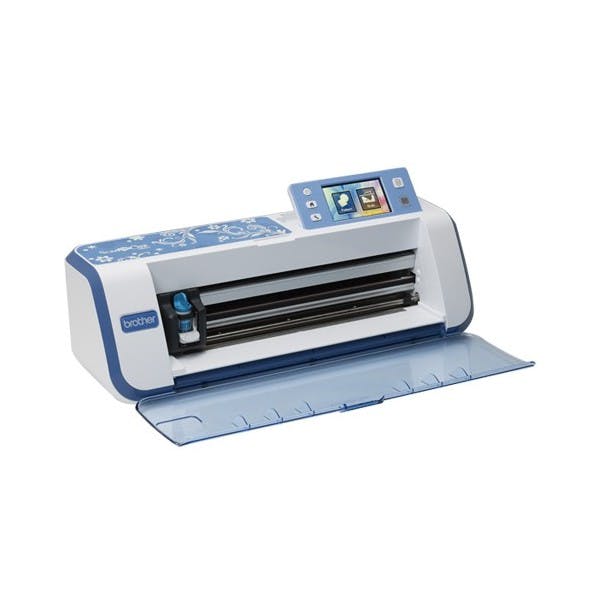




Specifications
| 3.7" Color LCD | TFT 3.67" Color touch screen |
| Lightweight | 8.25 lbs. with handle for portability |
| Easy to Operate Buttons | Power, Start/Stop, Feed, Setting, Home Ability to pause the machine with Start/Stop LED button |
| Holder | Easy to set/removable |
| AC Adapter | For global use |
| USB slot | High-speed USB host |
| Easy to View Operation Panel | 3 viewing angles |
| Stylus | For easy on-screen edits on the LCD |
| Auto Shutdown | Adjustable |
| Machine memory | 1MB or 60 pockets |
Crafting Workspace
| Work Area | 11.75" x 11.75" |
| Optional Extended Work Area | 11.75" x 23.75" |
| Standard Blade | Max 1.0mm (may vary) |
| Deep Blade | Max 1.5mm (may vary) |
| Blade Depth Adjustment | 12 levels |
| Cutting Speed | 5 levels |
| Adjustable Holder Pressure | 19 levels |
| Cutting Material: Max 2.0mm (may vary) | Paper (max 1.5mm): Printer/Scrapbook/Cardstock/Velum/Tracing/Poster board. Fabric: Thin cottin/Flannel/Felt. Others: Magnet/Sticker or seal |
Scanning
| Scanning Size 12" x 12" | Work Area: 11.75" x 11.75" |
| Image Type | Full color |
| Thickness of Scanning material | 1.5mm (max) : Standard/Low Tack mat |
| Scanning Speed | 30 sec/mat |
| Scan resolution | 300 DPI |
| Recognition Type | Gray scale 256 |
| Background Scan Adjustment | Darker/Lighter |
| Direct Cut | Frame Types (11) |
| Scan-to-Cut Data | Detection Type: Outline, Region, Line (Thinning). Saving Data Function after detection. Deletion Area (unwanted scanned images) up to 3.9" per deletion. Threshold for converting: 5 level |
| Scan to USB | Scan Size: 7 format |
| Scan to USB Output File Format | Select Scan Resolution: 300/250/200/150/100 DPI as JPEG data |
Features
| Language | 8 (English, German, French, Dutch, Italian, Spanish, Russian, Japanese) |
| Opening Screen | On/Off |
| Test Cutting Function | Three patterns for test |
| Buzzer | On/Off |
| Cut Area | Able to change by drag/drop operation |
| Mat Preview | Grid Measurement |
| Built-in Designs | 700 |
| Built-in Quilt Patterns | 140 |
| Built-in fonts | 5 |
| Drag & Drop Function | Select / move designs on the LCD using the stylus |
| Add Patterns | Add other designs |
| Enlargement Reduction Feature | Designs can be enlarged or reduced |
| On-Screen Editing Functions | Sizing (height and width), Duplicating, Lock and Unlocking the Aspect Ratio, Pattern rotation in 1 degree increments, mirroring, seam allowance on/off, unifying, welding, group deleting / group selecting, auto layout by rearranging patterns: rotate at any angle, rotate patterns 0 degrees or 180 degrees, without rotating |
| Seam Allowance Width | 7 levels |
| Pattern Spacing/Pattern Interval | 10 levels (width between pattern and pattern/edge of mat) |